 Zorin OS
 Linux
 LibreOffice
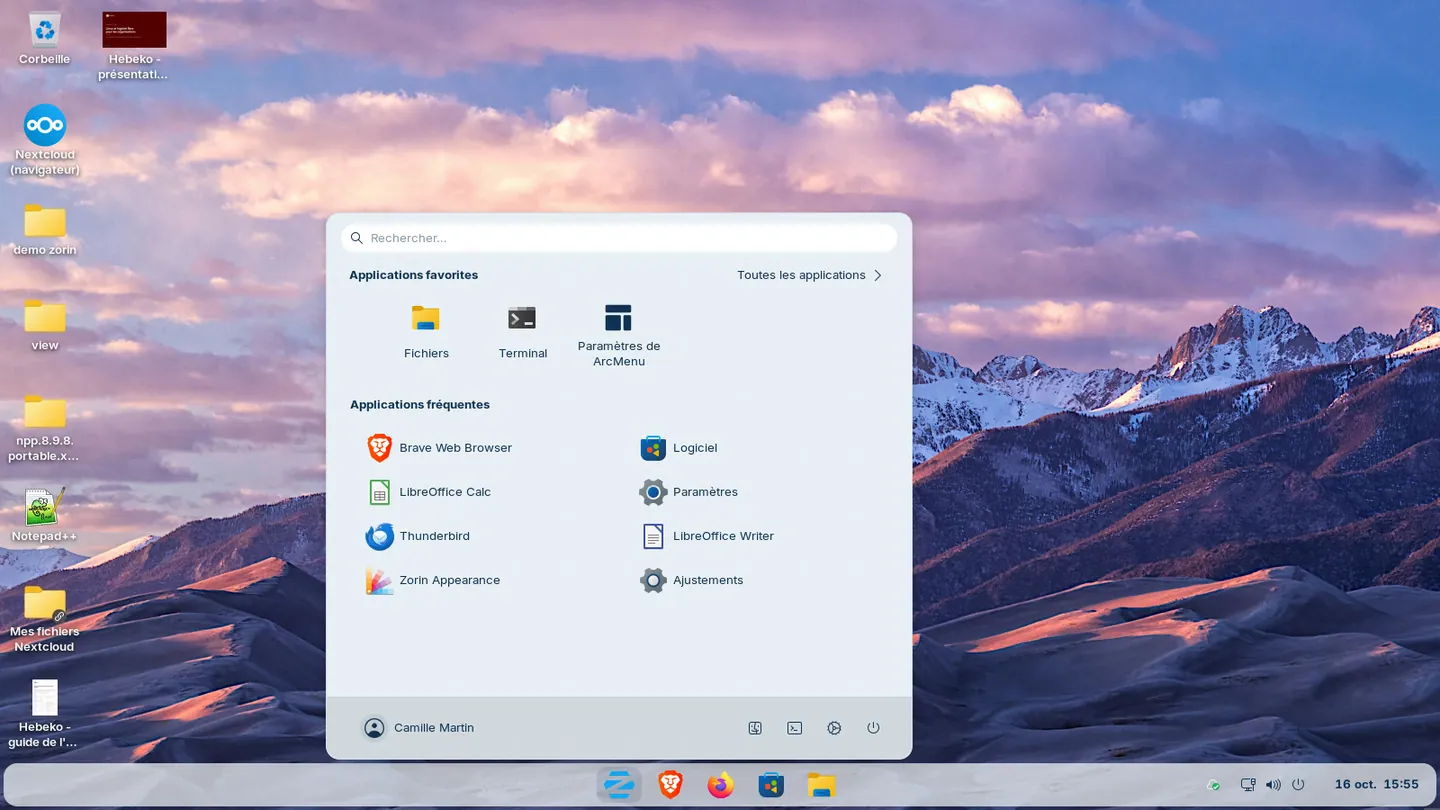
Zorin OS is a Linux system whose desktop keeps the Windows taskbar and menu. The course starts from what staff already do on Windows and shows them where to find it. The same programme applies to Ubuntu, Debian or Linux Mint if your fleet runs one of these systems.
Objectives
After the first two days, each participant can:
- find on the Zorin OS desktop the menu, taskbar, shortcuts and settings they used on Windows
- organise their files, open shared folders and print on the office copiers
- write letters and spreadsheets with LibreOffice, and exchange .docx and .xlsx files with outside contacts
- know what to do when a Windows program is missing
After day 3, the champion can also:
- set up a colleague's computer and fix the common issues of the first weeks
- run a one-hour onboarding session with the kit provided
- pass on to the IT team or the provider what they cannot fix
Who this course is for
A local authority or public body
Staff take the first two days just before their computer switches over. Two to six champions also take day 3. They then train the other staff, department by department, with the kit handed out at the end. This is how Échirolles has been moving its computers to Zorin OS since 2024, with a pilot followed by a voluntary phase.
A company or non-profit
Employees and volunteers learn to work on the computer that replaces Windows, with the sharing tools you already use, a network folder or Nextcloud.
An organisation keeping its Windows 10 computers
A computer rejected by Windows 11 usually runs Zorin OS. Training users before changing the system avoids the migration resting on the IT team alone.
Custom training
The programme below is a starting point. The first two days can be taken on their own. Day 3 is for champions. For users who are already at ease, the two days shrink to one.
Organisation
The details to enter in your training plan.
| Item | Detail |
|---|---|
| Duration | 2 days (14 hours) for users, 3 days (21 hours) for champions |
| Hours | 9:00 to 12:30 and 14:00 to 17:30, including two 15-minute breaks. On site, hours can be adjusted |
| Format | Remote, or on your premises |
| Group | 6 to 12 participants on days 1 and 2, 2 to 6 champions on day 3 |
| Resources | Computers set up with Zorin OS or your fleet's system, course material, cheat sheet and champion kit |
| Assessment | Hands-on exercises at each step, a full work scenario on day 2, an onboarding session run by each champion on day 3 |
| Certificate | Certificate of completion for each participant |
Program
Day 1: Finding your way
Morning
- The Zorin OS desktop next to Windows: menu, taskbar, notifications, settings
- Setting the desktop layout with Zorin Appearance
- The shortcuts that stay the same (copy, paste, Alt+Tab) and those that change
- Tiled windows and virtual desktops
Afternoon
- Your files: the Files app instead of Explorer, personal folders, USB drives, shared folders, OneDrive or Nextcloud
- Printers, copiers and scanners: adding a network printer, double-sided printing, saving as PDF
- Wi-Fi, second screen, sound, microphone and camera for video calls
- Workshop: the first day on Zorin OS, with your files, a print job and a video call
Day 2: Working without Windows
Morning
- LibreOffice Writer and Calc next to Word and Excel: where the commands are, opening and sending back .docx and .xlsx files
- LibreOffice Impress for slides, PDF export
- Firefox: bookmarks, passwords, and online tools (Microsoft 365, business software) installed as apps
Afternoon
- When a Windows program is missing: the Linux or web version Zorin offers when you open an .exe, the free equivalent, Wine for a few programs, remote access to a Windows computer for business software
- The Échirolles example: pilot, voluntary phase, remote Windows server for Excel, business software kept
- Updates and everyday security: locking the session, passwords, attachments
- Asking for help: describing a problem so it gets fixed quickly
- Final workshop: a work scenario, with a letter, a tracking spreadsheet, a PDF sent and a file placed on a share
Day 3: Supporting colleagues (champions)
Morning
- The champion's role: first-level help, relay to the IT team or the provider
- Setting up a colleague's computer: account, printers, folders, apps from the software centre, desktop layout
- Common issues in the first weeks: missing printer, .docx layout, forgotten password, second screen
- Helping a colleague remotely with your fleet's support tool
Afternoon
- Running a one-hour onboarding session with the kit material and exercises
- Noting the difficulties met and passing them on to improve the computers
- Workshop: each champion runs a session in front of the group, then handles three simulated help requests
Frequently asked questions
Can the course be held remotely?
Yes. It takes place on your premises or remotely, by video call.
Is technical knowledge needed?
Not for the first two days. Everyday Windows use is enough. Day 3 requires the first two days.
Why Zorin OS?
Its desktop keeps the Windows taskbar and menu, it is based on Ubuntu LTS (a release supported for five years) and the Core edition is free. It is the system we recommend by default for the computers of an organisation leaving Windows. Our article on Zorin OS explains this choice and its limits.
Does the course work with Ubuntu, Debian or Linux Mint?
Yes. The programme is written for Zorin OS and adapts to the system deployed in your organisation.
Next steps
To prepare and deploy the computers: Moving your computers from Windows to Linux. For the IT team that maintains the fleet: Linux administrator training. For files and video calls: Nextcloud training.